Last updated
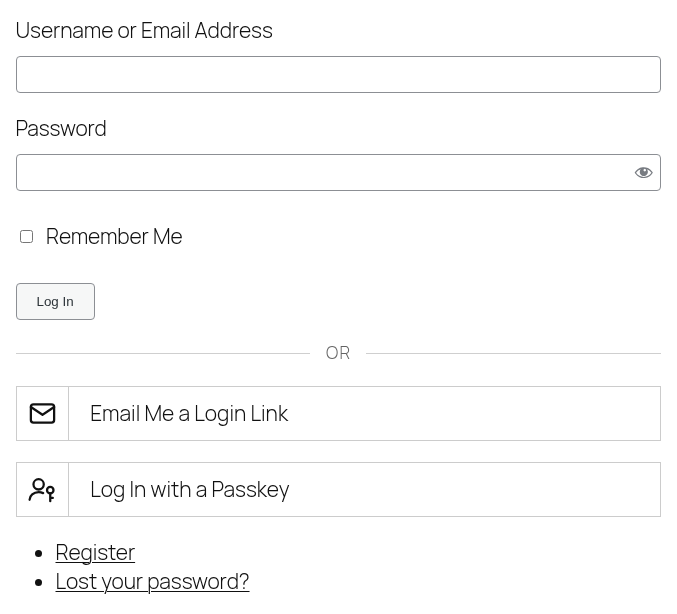
Click "Email Me a Login Link" on the login form to get an email with a one-time login link and an 8-digit code. Open the link, or enter the code, to log in.
If a username or email address is already typed into the form, the email goes out right away. Otherwise a form asks for one first.
The Email
The email is titled "Your login link" and holds both a link and a code. They expire after the time set under Link Expiration (15 minutes by default) and work only once: using either one uses up both.
The page says an email was sent whether or not the account exists, so the form can't be used to find out who has an account. Asking again replaces the earlier link and code, and a new email can be sent once a minute.
Opening the Link
Opened in the browser that asked for it, the link logs straight in. Opened anywhere else, such as on a phone after asking from a computer, it shows a "Continue as" button to click first. That keeps email security scanners, which open links on their own, from using the link up.
"Remember Me" on the request form carries over to the login.
Entering the Code
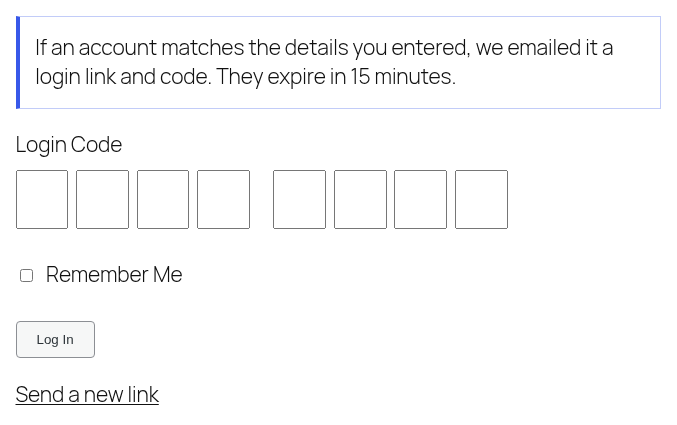
After the email is sent, the login form asks for the code, with one box per digit. Pasting the code into any box, or letting the browser or phone fill it in, fills them all. After five wrong codes, the code stops working and a new one has to be requested.
When a Link Stops Working
Besides expiring, a pending link and code are cancelled when the user's password is reset or changed, or their email address is changed. Requesting a new one fixes "That login link is invalid or has expired."
Users Who Can't Use Links
Users in an excluded role get an email titled "Login link not available" asking them to log in with their password.
With Other Extensions
- 2FA: a login link or code is one factor, so users with 2FA on still get the 2FA step afterward. Users whose 2FA codes come by email can't use login links at all, since both factors would be the same inbox.
- Moderation: users awaiting activation or approval can't log in with a link, just as with a password.
- Security: locked accounts stay locked.
- Notifications: the "Passwordless Login" trigger fires after a link, code or passkey login, with
%login_method%holding which one was used. The "Login Link Notification" and "Login Link Unavailable Notification" emails can also be edited under Default Notifications, using%login_link%,%login_code%and%link_expiration%.